 FEx Symbolizer
Production errors to source-code lines.
FEx Symbolizer turns production errors into actionable source-code lines, privately.
How it works
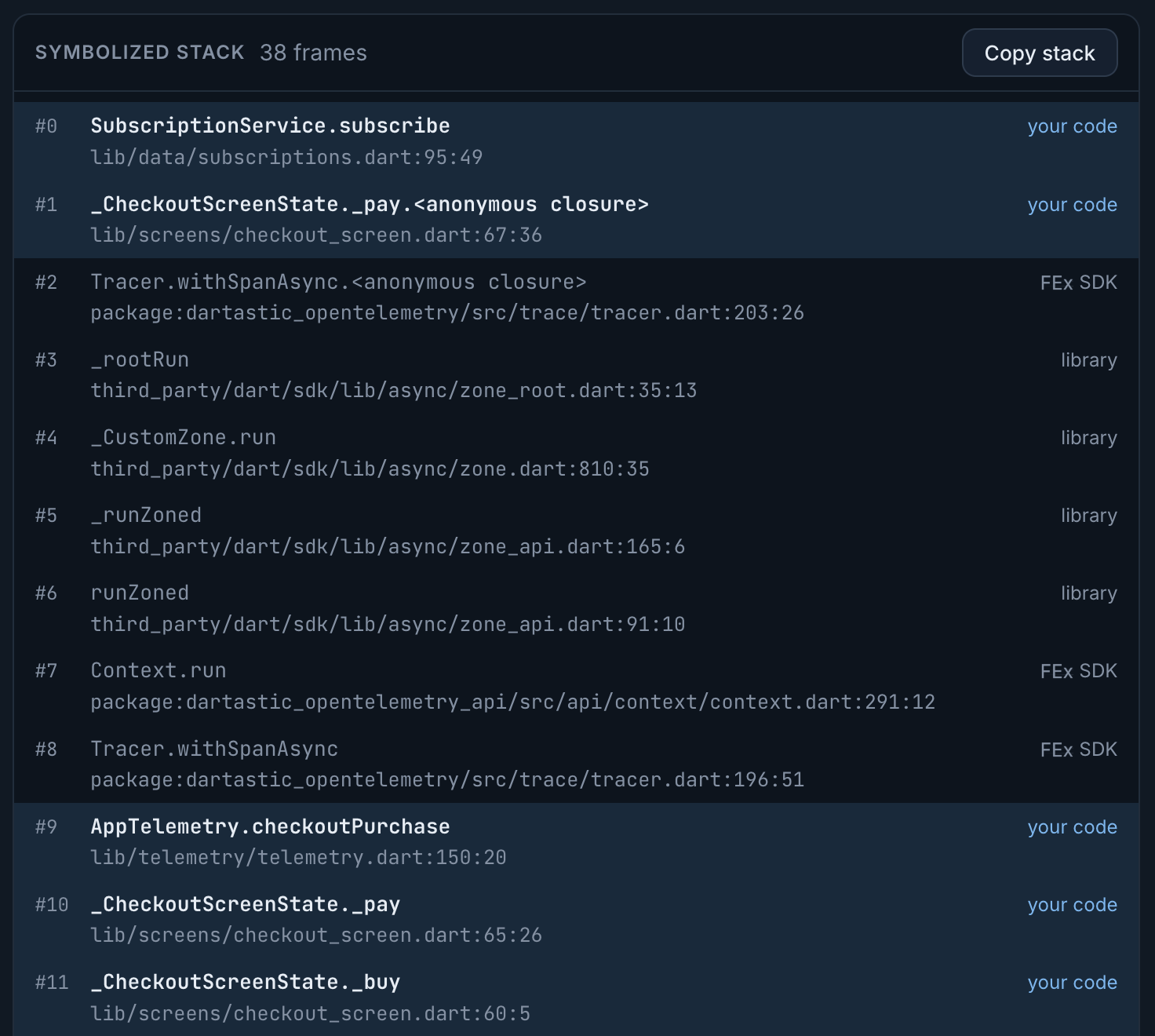
When the Native SDK detects an error, it can call FEx Symbolizer and augment the error with its source code location. You see the source code stack right in FEx Observatory.
Debug symbols (or source maps) + your app = your source code. Uploading them to your observability vendor adds an attack surface for your IP, and devops pain on top of it.
Keep your symbols where you publish packages, in FEx Pub, where you control who sees your IP.
Stack traces. Solved.
Send an obfuscated production stack trace, get back the same trace with real function names and source-code line numbers. Symbols stay in your FEx Pub server, no need to upload them separately to your observability vendor, reducing the attack surface on your IP.
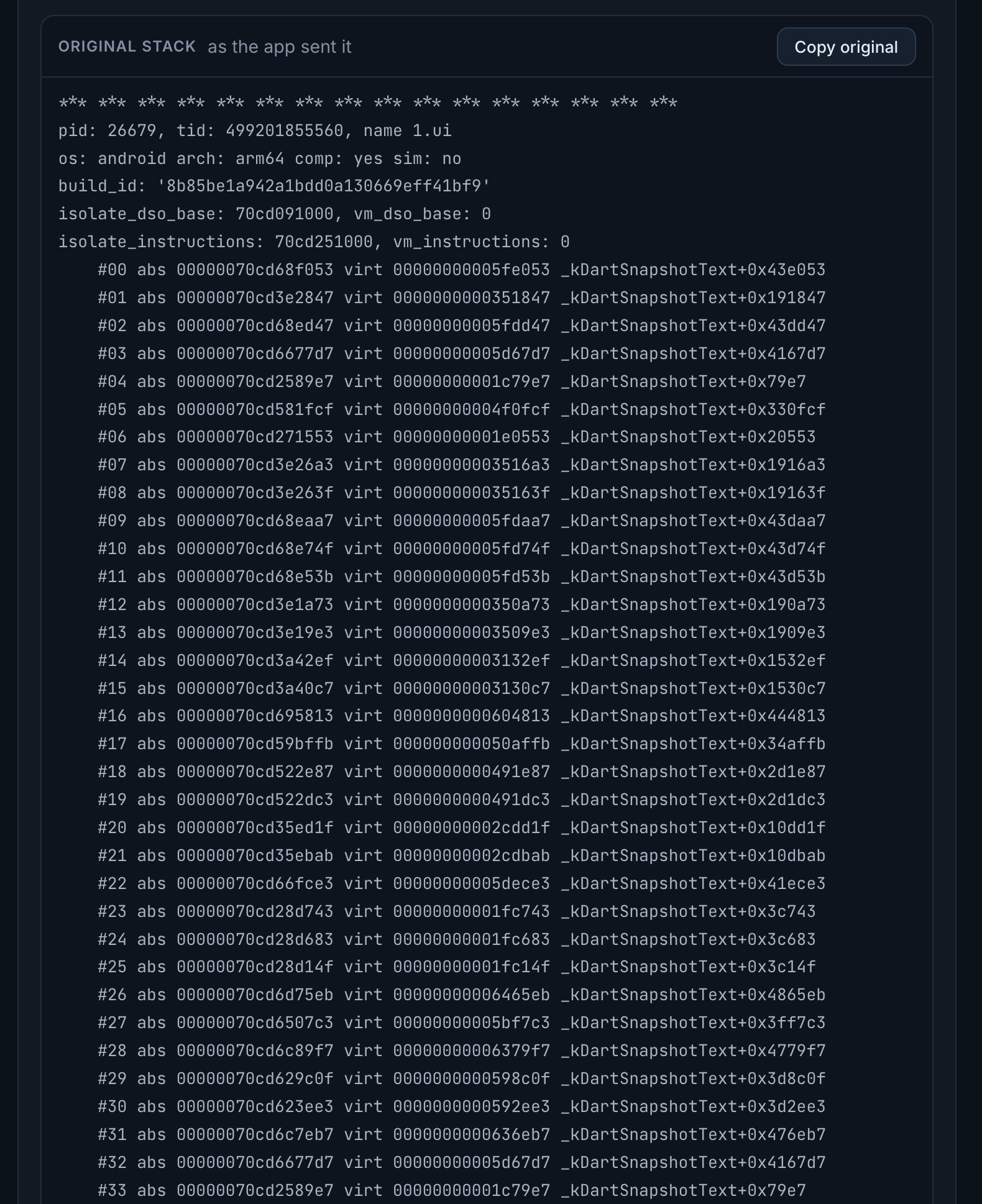
The FEx Native OTel SDK calls FEx Symbolizer after span errors or crashes and rewrites the trace upstream of the exporter, so what you see in FEx Observatory isn't gobbledygook: it's a human-readable stack trace pointing at the source code lines involved in the problem.
Advantages
- Readable errors power your whole workflow. An error that names the file and line is a ticket you can triage, assign, and fix before lunch. Symbolization is the difference between watching production and understanding it. Once your team has it, you'll wonder how you shipped without it.
- It's automatic. Publish and you're done. Build with
flutter build apk --release --obfuscate --split-debug-info=symbols/and publish your release to your private FEx Pub with the.symbolsalong for the ride. The FEx Symbolizer finds the exact symbols for every app, version, and platform on its own. Version 1.4.0's errors stay readable years from now. - Easier than Sentry or Crashlytics. Those platforms ask you to upload debug symbols to them, for every platform, on every release, as a CI step you build and babysit. FEx skips the whole ceremony. Your symbols are already home.
- More secure, too. Debug symbols are the map back to your source code, and uploading them to a vendor widens the attack surface on your IP. With FEx they stay in your private Pub, guarded by your keys. FEx Observatory only ever receives friendly, readable text.
- Source lines right in FEx Observatory. Errors arrive in FEx Observatory with their source lines, on the trace and in what FEx AI reads. Nothing to install, no integration to wait for.
- Milliseconds, as part of the trace. One simple API. Cached lookups answer in milliseconds, and every response includes your month-to-date usage. It feels like the trace was never obfuscated at all.
Symbols stay part of your build system.
Most teams upload .symbols / .dSYM to Datadog, Sentry, or similar as a separate step. That hands the vendor a key to reconstruct your source. FEx Symbolizer keeps the symbol files inside pub.fex.flutterrific.io and only emits the deobfuscated text downstream.
On-prem option (Compliance)
Regulated workflows can run FEx Symbolizer inside their Perimeter as part of a locked-down FEx Dedicated platform. Production traces never leave the customer's network.
Auto-fetch from FEx Pub
Publish your Flutter app to pub.fex.flutterrific.io with flutter build apk --release --obfuscate --split-debug-info=symbols/; the FEx Symbolizer downloads the archive on first cache miss. No second upload step.
Get FEx Symbolizer
FEx Symbolizer is included with OTel Pro and FEx Observatory. Pick the plan that fits and FEx Symbolizer comes with it.